Gametime api
Overview
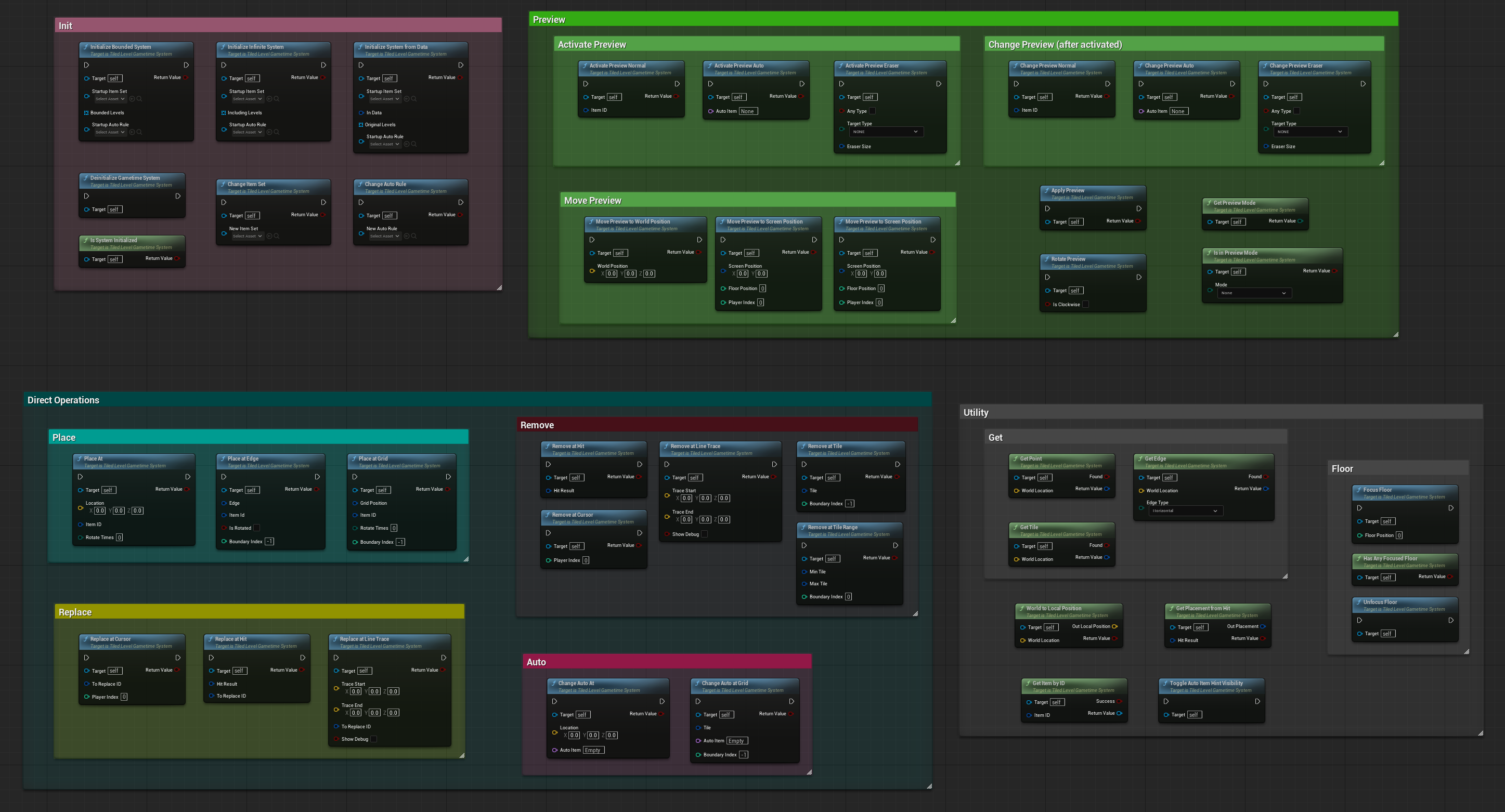
The Gametime System is a Game Instance Subsystem that provides runtime level building functionality. It supports both bounded (limited area) and infinite building modes, with a unified preview system, auto-paint support, and comprehensive placement operations.
Properties
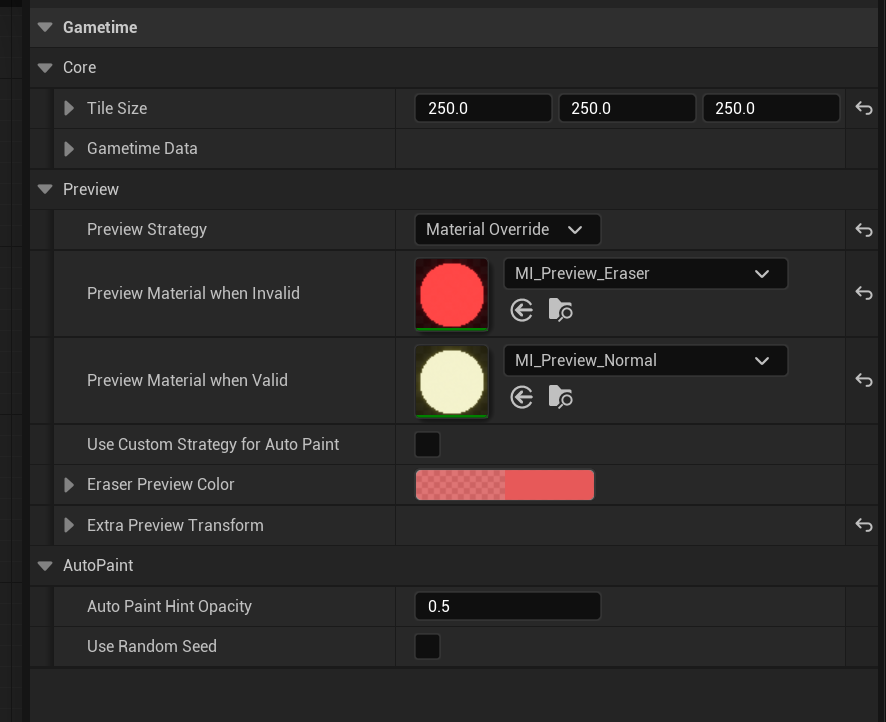
These are the public properties exposed in the Gametime System that you can configure in Blueprint.
Core Settings
TileSize (FVector)
The most important property! Defines the size of each tile in the grid system. This must match across your item set and any tiled levels. Cannot be changed after initialization.
GametimeData (FTiledLevelGameData)
Where the runtime data is stored. This contains all placements, auto paint data, and boundary information. You can access this to pass to save game objects when you need save/load functionality.
Preview Settings
PreviewStrategy (EPreviewStrategy)
Determines how preview validation is displayed to the player:
- Visibility: Show/hide the preview based on validity (simple on/off)
- MaterialOverride: Use different materials for valid vs invalid states
- Custom: Handle validation display yourself via OnCustomNormalPreviewValidation event (full control)
PreviewMaterialWhenValid (UMaterialInterface*)
Material to apply to preview mesh when placement is valid. Only used when PreviewStrategy is set to MaterialOverride.
PreviewMaterialWhenInvalid (UMaterialInterface*)
Material to apply to preview mesh when placement is invalid. Only used when PreviewStrategy is set to MaterialOverride.
bUseCustomStrategyForAutoPaint (Bool)
When true, uses custom preview validation for auto paint mode instead of the default hint visualization.
EraserPreviewColor (FLinearColor)
Color used for eraser preview visualization.
ExtraPreviewTransform (FTransform)
Additional transform applied to preview brush to prevent z-fighting with existing placements.
AutoPaint Settings
AutoPaintHintOpacity (Float)
Opacity level for auto paint position and auto paint preview hints.
bUseRandomSeed (Bool)
Use a fixed random seed for all random variations in auto placements? (like rotation, mesh selection, etc.)
Seed (Int)
The fixed random seed value used when bUseRandomSeed is enabled. Only visible and used when bUseRandomSeed is true.
Initialization
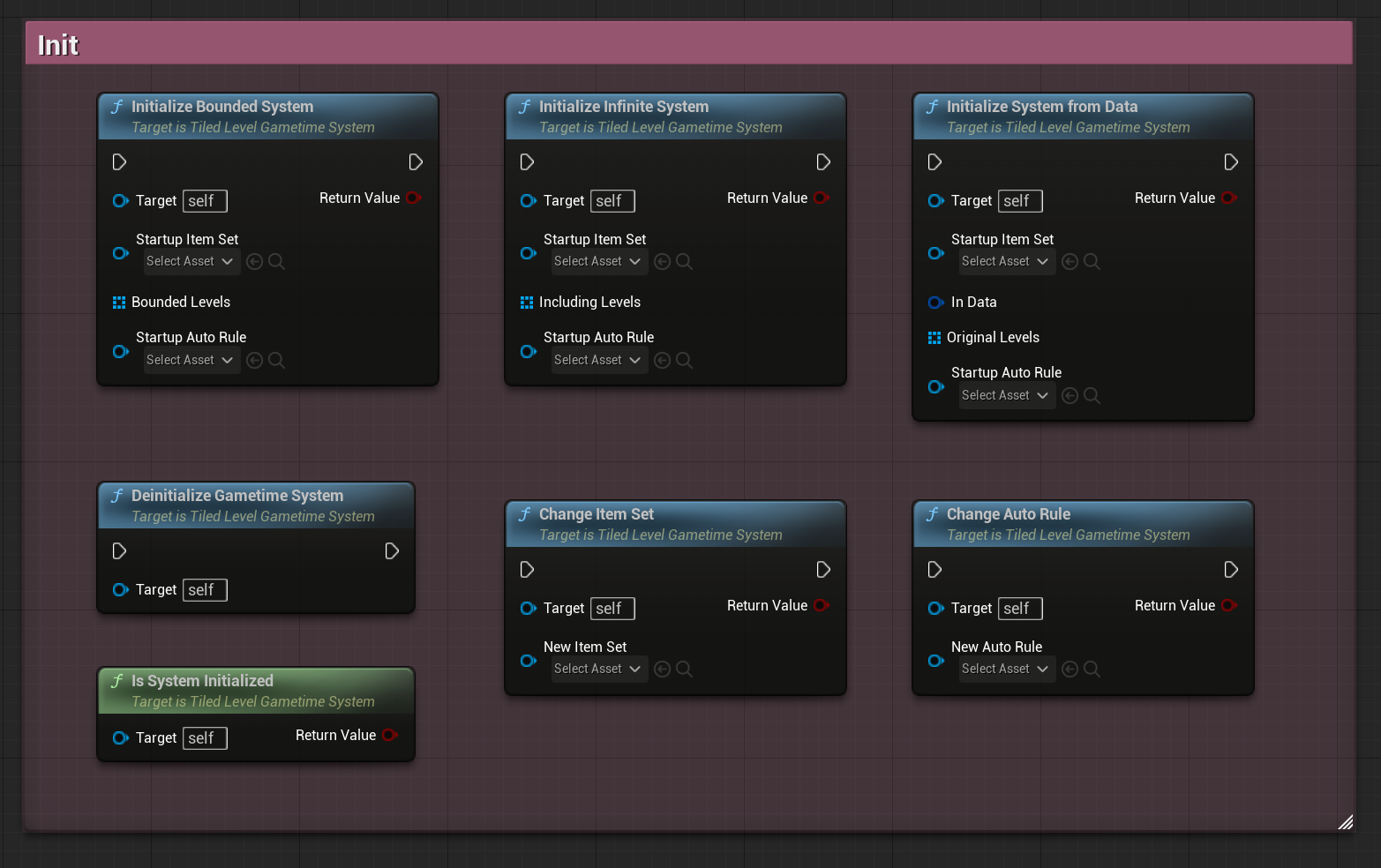
InitializeInfiniteSystem
Initialize the system for unlimited building anywhere in the world.
| Parameter | Type | Description |
|---|---|---|
| WorldContext | UObject* | World context object |
| StartupItemSet | UTiledItemSet* | The item set to use |
| IncludingLevels | TArray<ATiledLevel*> | Existing levels to include |
| StartupAutoRule | UAutoPaintRule* | Optional auto paint rule |
| Return Value | Bool | Success or failure |
InitializeBoundedSystem
Initialize the system with building restricted to specific level boundaries.
| Parameter | Type | Description |
|---|---|---|
| WorldContext | UObject* | World context object |
| StartupItemSet | UTiledItemSet* | The item set to use |
| BoundedLevels | TArray<ATiledLevel*> | Levels that define building boundaries |
| StartupAutoRule | UAutoPaintRule* | Optional auto paint rule |
| Return Value | Bool | Success or failure |
InitializeSystemFromData
Initialize the system from saved game data.
| Parameter | Type | Description |
|---|---|---|
| WorldContext | UObject* | World context object |
| StartupItemSet | UTiledItemSet* | The item set to use |
| InData | FTiledLevelGameData | Saved game data |
| OriginalLevels | TArray<ATiledLevel*> | Original levels from the save |
| StartupAutoRule | UAutoPaintRule* | Optional auto paint rule |
| Return Value | Bool | Success or failure |
DeinitializeGametimeSystem
Clean up and shut down the gametime system.
ChangeItemSet
Switch to a different item set. Will fail if tile sizes don’t match.
| Parameter | Type | Description |
|---|---|---|
| NewItemSet | UTiledItemSet* | The new item set to use |
| Return Value | Bool | Success or failure |
ChangeAutoRule
Switch to a different auto paint rule. Will fail if it doesn’t match current item set.
| Parameter | Type | Description |
|---|---|---|
| NewAutoRule | UAutoPaintRule* | The new auto paint rule to use |
| Return Value | Bool | Success or failure |
IsSystemInitialized
Check if the gametime system has been initialized.
| Parameter | Type | Description |
|---|---|---|
| Return Value | Bool | True if system is initialized |
Preview System
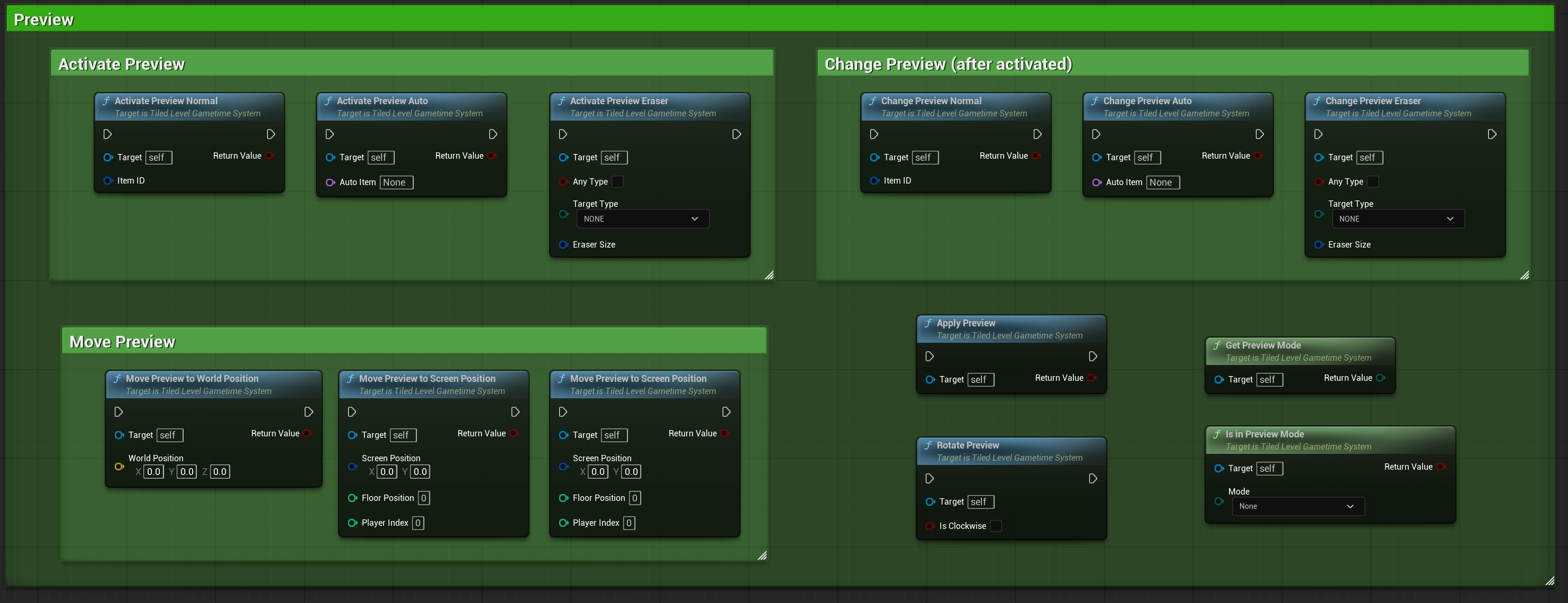
The new preview system unifies all preview modes (Normal, AutoPaint, Eraser) with consistent API.
Activation Functions
ActivatePreview_Normal
Activate preview mode for normal item placement.
| Parameter | Type | Description |
|---|---|---|
| ItemID | FGuid | The unique ID of the item to preview |
| Return Value | Bool | Success or failure |
ActivatePreview_Auto
Activate preview mode for auto paint.
| Parameter | Type | Description |
|---|---|---|
| AutoItem | FName | The auto item name to preview |
| Return Value | Bool | Success or failure |
ActivatePreview_Eraser
Activate eraser preview mode.
| Parameter | Type | Description |
|---|---|---|
| bAnyType | Bool | Erase any type of placement |
| TargetType | EPlacedType | Specific type to erase (if bAnyType=false) |
| EraserSize | FIntVector | Size of eraser in tiles |
Change Active Preview
ChangePreview_Normal
Change the active preview to a different normal item.
| Parameter | Type | Description |
|---|---|---|
| ItemID | FGuid | The unique ID of the new item |
| Return Value | Bool | Success or failure |
ChangePreview_Auto
Change the active preview to a different auto item.
| Parameter | Type | Description |
|---|---|---|
| AutoItem | FName | The new auto item name |
| Return Value | Bool | Success or failure |
ChangePreview_Eraser
Change eraser settings while in eraser mode.
| Parameter | Type | Description |
|---|---|---|
| bAnyType | Bool | Erase any type of placement |
| TargetType | EPlacedType | Specific type to erase (if bAnyType=false) |
| EraserSize | FIntVector | Size of eraser in tiles |
DeactivatePreview
Exit preview mode completely.
Movement Functions
MovePreviewToWorldPosition
Move the active preview to a world position (snaps to grid based on placement type).
| Parameter | Type | Description |
|---|---|---|
| WorldPosition | FVector | Target world position |
| Return Value | Bool | Success or failure |
MovePreviewToCursor
Move the active preview to the cursor position.
| Parameter | Type | Description |
|---|---|---|
| FloorPosition | Int | The Z-level floor position |
| PlayerIndex | Int | Player index (default: 0) |
| Return Value | Bool | Success or failure |
MovePreviewToScreenPosition
Move the active preview to a specific screen position.
| Parameter | Type | Description |
|---|---|---|
| ScreenPosition | FVector2D | Target screen position |
| FloorPosition | Int | The Z-level floor position |
| PlayerIndex | Int | Player index (default: 0) |
| Return Value | Bool | Success or failure |
Preview Actions
ApplyPreview
Apply the current preview (build item, paint auto, or erase).
| Parameter | Type | Description |
|---|---|---|
| Return Value | Bool | Success or failure |
RotatePreview
Rotate the active preview.
| Parameter | Type | Description |
|---|---|---|
| IsClockwise | Bool | Rotation direction (default: false) |
Preview Status
GetPreviewMode
Get the current preview mode.
| Parameter | Type | Description |
|---|---|---|
| Return Value | EGametimePreviewMode | None, Normal, AutoPaint, or Eraser |
IsInPreviewMode
Check if currently in a specific preview mode.
| Parameter | Type | Description |
|---|---|---|
| Mode | EGametimePreviewMode | Mode to check |
| Return Value | Bool | True if in specified mode |
Direct Operations (Without Preview)
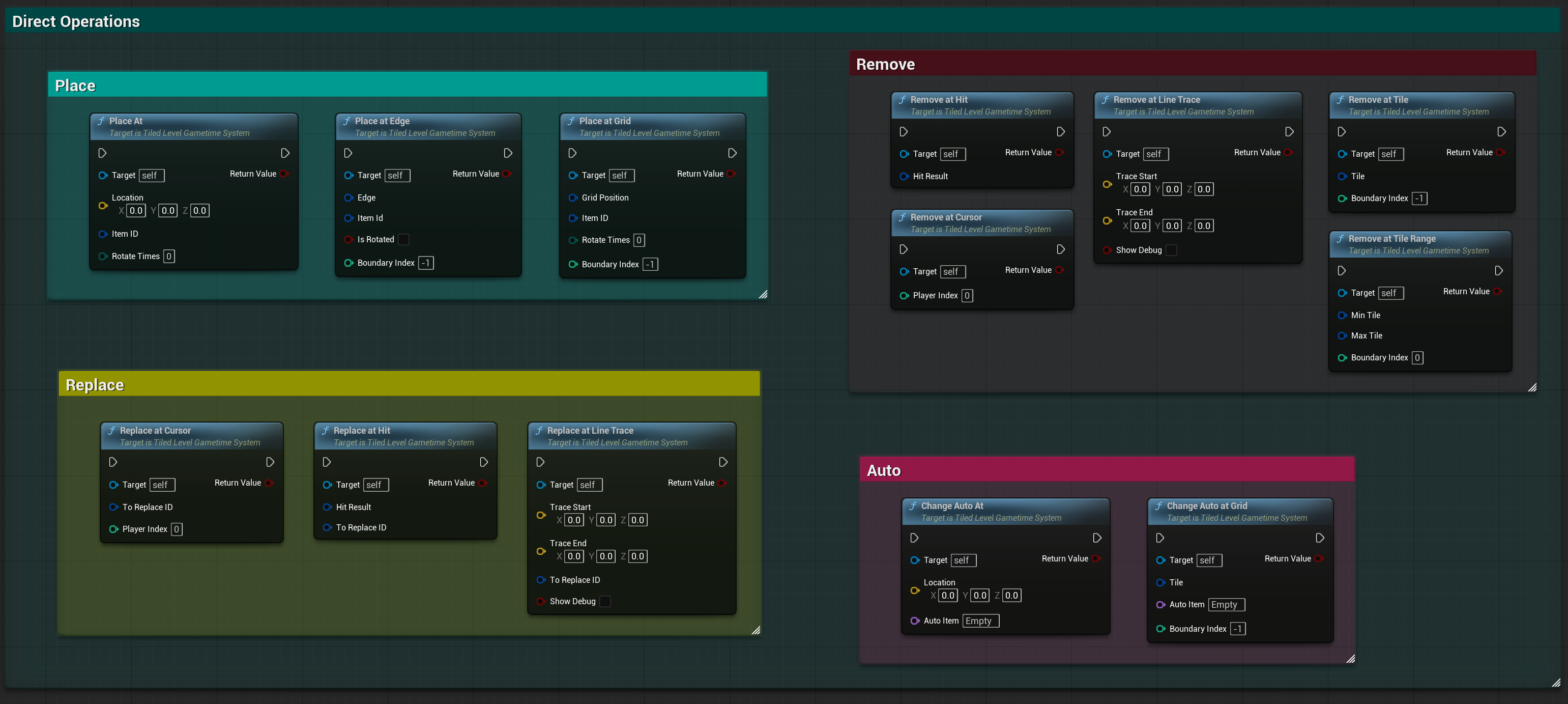
These functions perform operations directly without using the preview system.
Place Operations
PlaceAt
Build item at a world location (snaps to closest tile position).
| Parameter | Type | Description |
|---|---|---|
| Location | FVector | World location |
| ItemID | FGuid | Item to place |
| RotateTimes | uint8 | Number of 90° rotations (default: 0) |
| Return Value | Bool | Success or failure |
PlaceAt_Grid
Build item at specific grid position.
| Parameter | Type | Description |
|---|---|---|
| GridPosition | FIntVector | Grid position |
| ItemID | FGuid | Item to place |
| RotateTimes | uint8 | Number of 90° rotations (default: 0) |
| BoundaryIndex | Int | Boundary index (default: -1, auto-detect) |
| Return Value | Bool | Success or failure |
PlaceAt_Edge
Build item at specific edge.
| Parameter | Type | Description |
|---|---|---|
| Edge | FTiledLevelEdge | Edge position |
| ItemId | FGuid | Item to place |
| bIsRotated | Bool | Is edge rotated |
| BoundaryIndex | Int | Boundary index (default: -1, auto-detect) |
| Return Value | Bool | Success or failure |
Remove Operations
RemoveAt_Tile
Remove all placements at a specific tile (mimics eraser behavior).
| Parameter | Type | Description |
|---|---|---|
| Tile | FIntVector | Tile position |
| BoundaryIndex | Int | Boundary index (default: -1, auto-detect) |
| Return Value | Bool | Success or failure |
RemoveAt_TileRange
Erase all placements in a tile range.
| Parameter | Type | Description |
|---|---|---|
| MinTile | FIntVector | Minimum tile position |
| MaxTile | FIntVector | Maximum tile position |
| BoundaryIndex | Int | Boundary index |
| Return Value | Bool | Success or failure |
RemoveAt_Hit
Remove item from hit result (use after line trace).
| Parameter | Type | Description |
|---|---|---|
| HitResult | FHitResult | The hit result |
| Return Value | Bool | Success or failure |
RemoveAt_Cursor
Get hit under cursor then remove the hit item.
| Parameter | Type | Description |
|---|---|---|
| PlayerIndex | Int32 | Player index (default: 0) |
| Return Value | Bool | Success or failure |
RemoveAt_LineTrace
Perform line trace then remove the hit item.
| Parameter | Type | Description |
|---|---|---|
| TraceStart | FVector | Start of line trace |
| TraceEnd | FVector | End of line trace |
| bShowDebug | Bool | Show debug visualization (default: false) |
| Return Value | Bool | Success or failure |
Replace Operations
ReplaceAt_Hit
Replace placement with new item (same type and size required).
| Parameter | Type | Description |
|---|---|---|
| HitResult | FHitResult | The hit result |
| ToReplaceID | FGuid | ID of replacement item |
| Return Value | Bool | Success or failure |
ReplaceAt_Cursor
Replace item under cursor.
| Parameter | Type | Description |
|---|---|---|
| ToReplaceID | FGuid | ID of replacement item |
| PlayerIndex | Int32 | Player index (default: 0) |
| Return Value | Bool | Success or failure |
ReplaceAt_LineTrace
Perform line trace then replace the hit item.
| Parameter | Type | Description |
|---|---|---|
| TraceStart | FVector | Start of line trace |
| TraceEnd | FVector | End of line trace |
| ToReplaceID | FGuid | ID of replacement item |
| bShowDebug | Bool | Show debug visualization (default: false) |
| Return Value | Bool | Success or failure |
AutoPaint Operations
ChangeAutoAt
Change auto item at world location.
| Parameter | Type | Description |
|---|---|---|
| Location | FVector | World location |
| AutoItem | FName | Auto item name (default: “Empty”) |
| Return Value | Bool | Success or failure |
ChangeAutoAt_Grid
Change auto item at specific grid position.
| Parameter | Type | Description |
|---|---|---|
| Tile | FIntVector | Grid position |
| AutoItem | FName | Auto item name (default: “Empty”) |
| BoundaryIndex | Int | Boundary index (default: -1, auto-detect) |
| Return Value | Bool | Success or failure |
Utility Functions
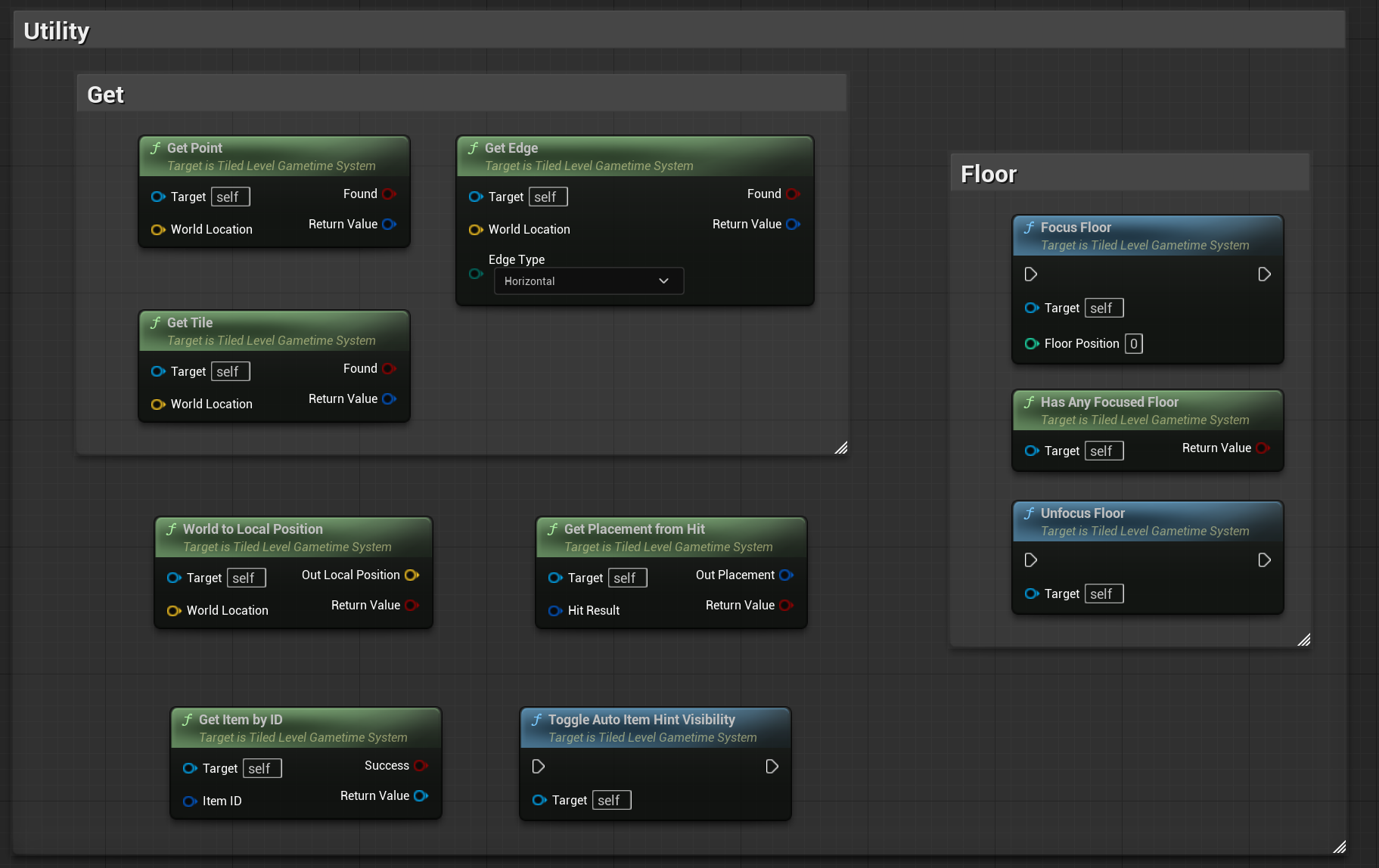
GetItemByID
Get item object by its unique ID.
| Parameter | Type | Description |
|---|---|---|
| ItemID | FGuid | Item unique ID |
| bSuccess | Bool | Output success flag |
| Return Value | UTiledLevelItem* | The item object (null if failed) |
GetTile
Get tile position from world location.
| Parameter | Type | Description |
|---|---|---|
| WorldLocation | FVector | World position |
| Found | Bool | Output found flag |
| Return Value | FIntVector | Tile position |
GetEdge
Get edge from world location.
| Parameter | Type | Description |
|---|---|---|
| WorldLocation | FVector | World position |
| EdgeType | EEdgeType | Horizontal or Vertical |
| Found | Bool | Output found flag |
| Return Value | FTiledLevelEdge | Edge data |
GetPoint
Get point position from world location.
| Parameter | Type | Description |
|---|---|---|
| WorldLocation | FVector | World position |
| Found | Bool | Output found flag |
| Return Value | FIntVector | Point position |
WorldToLocalPosition
Convert world location to local position (auto-finds boundary in bounded mode).
| Parameter | Type | Description |
|---|---|---|
| WorldLocation | FVector | World position |
| OutLocalPosition | FVector | Output local position |
| Return Value | Bool | True if location is valid |
GetPlacementFromHit
Get placement information from a hit result.
| Parameter | Type | Description |
|---|---|---|
| HitResult | FHitResult | The hit result |
| OutPlacement | FItemPlacement | Retrieved placement data |
| Return Value | Bool | Success or failure |
ToggleAutoItemHintVisibility
Show or hide hints for where auto items have been painted.
FocusFloor
Hide all other floors to focus on a specific floor only.
| Parameter | Type | Description |
|---|---|---|
| FloorPosition | Int | Floor Z-level to focus on |
UnfocusFloor
Unhide all floors.
HasAnyFocusedFloor
Check if any floor is currently focused.
| Parameter | Type | Description |
|---|---|---|
| Return Value | Bool | True if a floor is focused |
Override Functions
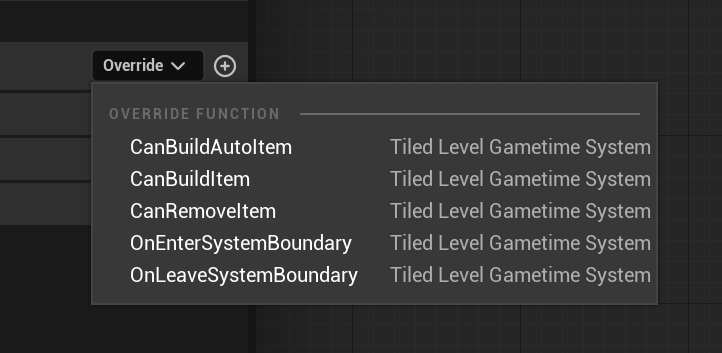
These Blueprint Native Events can be overridden to customize system behavior.
OnBeginSystem
Triggered after system initialization.
Previously, this event was triggered when the Game Instance subsystem was initialized automatically. As of the rewrite, it triggers after you manually initialize the system.
OnEnterSystemBoundary
Called when entering a system boundary (bounded mode only).
| In/Out | Name | Type | Description |
|---|---|---|---|
| In | NewBoundaryContext | FBoundaryContext | Information about new boundary |
OnLeaveSystemBoundary
Called when leaving system boundary (bounded mode only).
| In/Out | Name | Type | Description |
|---|---|---|---|
| In | PreviousBoundaryContext | FBoundaryContext | Information about previous boundary |
CanBuildItem
Override to add custom conditions for building items (e.g., resource checks).
| In/Out | Name | Type | Description |
|---|---|---|---|
| In | ItemToBuild | UTiledLevelItem* | The item you are trying to build |
| Out | Return Value | Bool | Can build result |
CanRemoveItem
Override to add custom conditions for removing items (e.g., resource requirements).
| In/Out | Name | Type | Description |
|---|---|---|---|
| In | ItemToRemove | UTiledLevelItem* | The item you are trying to remove |
| Out | Return Value | Bool | Can remove result |
CanBuildAutoItem
Override to add custom conditions for building auto items.
| In/Out | Name | Type | Description |
|---|---|---|---|
| In | AutoItemToBuild | FName | The auto item you are trying to build |
| Out | Return Value | Bool | Can build result |
Events (Delegates)
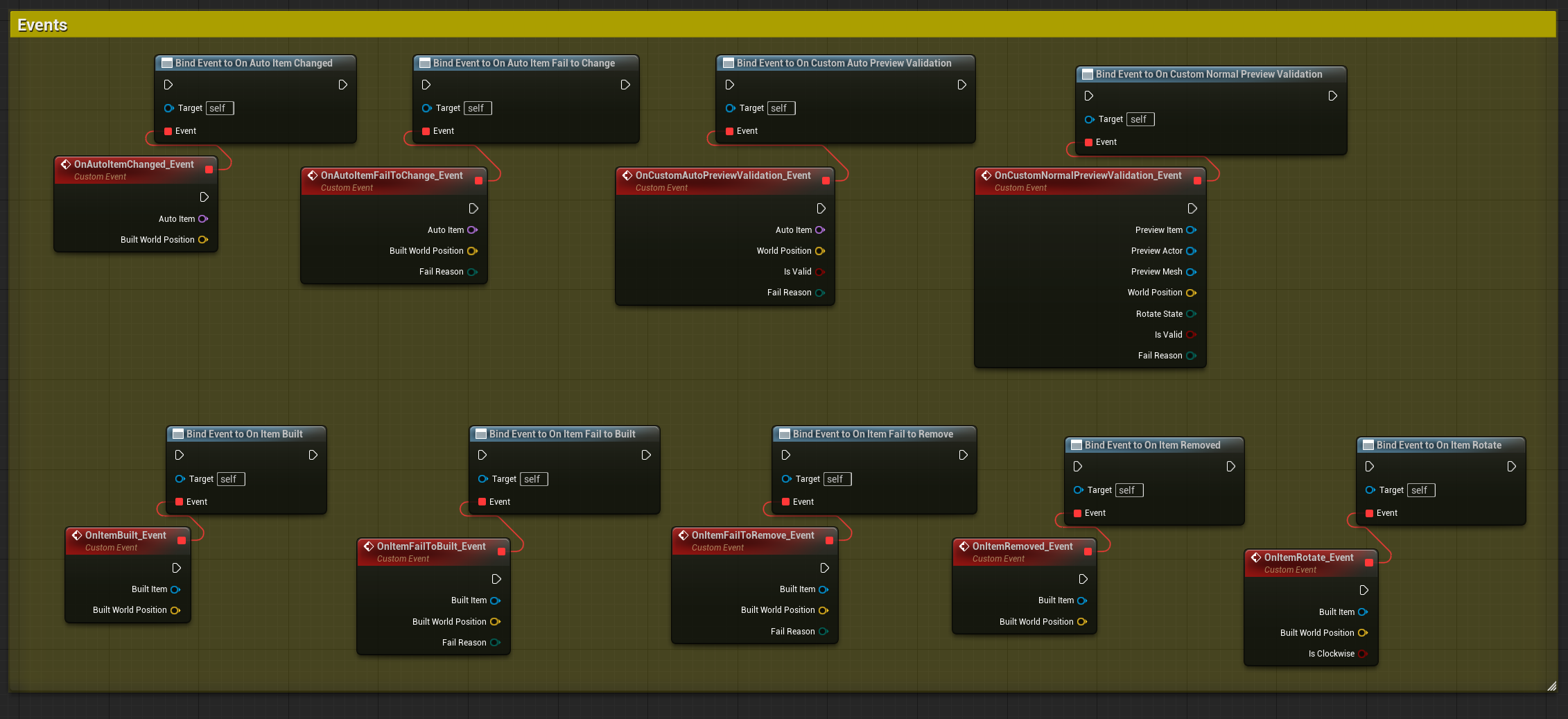
OnItemBuilt
Called when successfully building an item.
| Parameter | Type | Description |
|---|---|---|
| BuiltItem | UTiledLevelItem* | The item that was built |
| BuiltWorldPosition | FVector | World position where it was built |
OnItemRemoved
Called when successfully removing an item.
| Parameter | Type | Description |
|---|---|---|
| BuiltItem | UTiledLevelItem* | The item that was removed |
| BuiltWorldPosition | FVector | World position where it was |
OnItemFailToBuilt
Called when failing to build an item.
| Parameter | Type | Description |
|---|---|---|
| BuiltItem | UTiledLevelItem* | The item that failed to build |
| BuiltWorldPosition | FVector | World position attempted |
| FailReason | EFailReason | Why it failed |
OnItemFailToRemove
Called when failing to remove an item.
| Parameter | Type | Description |
|---|---|---|
| BuiltItem | UTiledLevelItem* | The item that failed to remove |
| BuiltWorldPosition | FVector | World position attempted |
| FailReason | EFailReason | Why it failed |
OnItemRotate
Called when rotating an item.
| Parameter | Type | Description |
|---|---|---|
| BuiltItem | UTiledLevelItem* | The item being rotated |
| BuiltWorldPosition | FVector | World position |
| IsClockwise | Bool | Rotation direction |
OnAutoItemChanged
Called when successfully adding/changing auto item and updating adjacent placements.
| Parameter | Type | Description |
|---|---|---|
| AutoItem | FName | The auto item that changed |
| BuiltWorldPosition | FVector | World position |
OnAutoItemFailToChange
Called when failing to change auto item.
| Parameter | Type | Description |
|---|---|---|
| AutoItem | FName | The auto item that failed |
| BuiltWorldPosition | FVector | World position attempted |
| FailReason | EFailReason | Why it failed |
OnCustomNormalPreviewValidation
Custom validation event for normal preview (when using Custom preview strategy).
| Parameter | Type | Description |
|---|---|---|
| PreviewItem | UTiledLevelItem* | Item being previewed |
| PreviewActor | AActor* | Preview actor |
| PreviewMesh | UStaticMeshComponent* | Preview mesh component |
| WorldPosition | FVector | World position |
| RotateState | uint8 | Current rotation state |
| bIsValid | Bool | Is placement valid |
| FailReason | EFailReason | Reason if invalid |
OnCustomAutoPreviewValidation
Custom validation event for auto paint preview (when bUseCustomStrategyForAutoPaint is true).
| Parameter | Type | Description |
|---|---|---|
| AutoItem | FName | Auto item being previewed |
| WorldPosition | FVector | World position |
| bIsValid | Bool | Is placement valid |
| FailReason | EFailReason | Reason if invalid |
Enums
EGametimeMode
System initialization mode.
| Value | Description |
|---|---|
| Uninitialized | System not initialized |
| Bounded | Building restricted to specific level boundaries |
| Infinite | Building allowed anywhere |
EGametimePreviewMode
Current preview mode.
| Value | Description |
|---|---|
| None | No active preview |
| Normal | Normal item placement preview |
| AutoPaint | Auto paint preview |
| Eraser | Eraser preview |
EPreviewStrategy
How preview validation is displayed.
| Value | Description |
|---|---|
| Visibility | Show/hide preview based on validity |
| MaterialOverride | Use different materials for valid/invalid states |
| Custom | Handle validation display via custom events |
EPreviewStatus
Preview validation status.
| Value | Description |
|---|---|
| Unknown | Validation not yet performed |
| Valid | Placement is valid |
| Invalid | Placement is invalid |
EFailReason
Reason why an operation failed.
| Value | Description |
|---|---|
| None | No failure |
| NoSpace | Not enough space |
| Custom | Custom validation failed |
| Restricted | Operation is restricted |
| OutOfBoundary | Outside system boundary |
| NotInitialized | System not initialized |
| InvalidItem | Item is invalid |
| TypeMismatch | Type doesn’t match |
| NoHit | No valid hit found |